

 العربية
 čeština
 Dansk
 Deutsch
 Ελληνικά
 English
 Español
 Eesti
 Suomi
 Français
 हिन्दी
 Hrvatski
 Magyar
 Italiano
 日本語
 한국어
 Lietuvių
 Nederlands
 Norsk
 Polski
 Português (Portugal)
 Português (Brasil)
 Română
 Slovenčina
 Slovenščina
 Svenska
 繁體中文
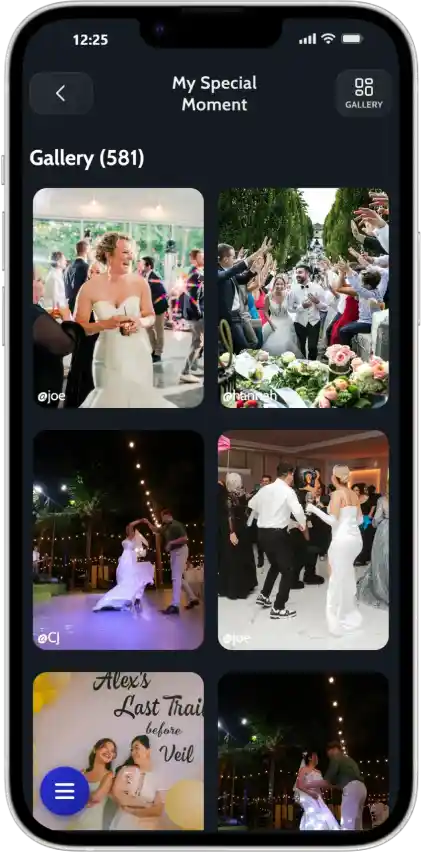

Capture with any camera
Front, back, or upload from gallery - all options work seamlessly
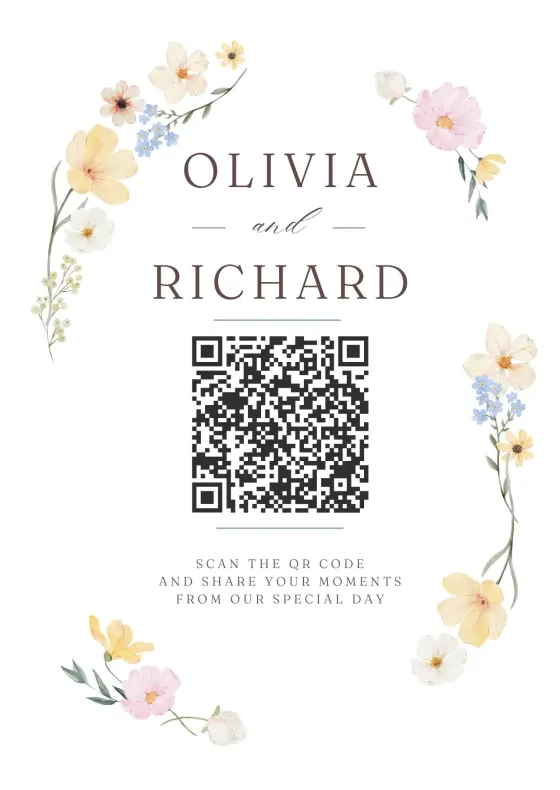
Design a printable QR code sign for your wedding, party or event in minutes. Pick a template, add your link and download a print-ready PDF. Free, no sign-up.
The page guests open when they scan: your photo album, RSVP, menu or any link.
No link yet? Create a free photo-sharing MomentDots
Corners
Centre
Backing
Placement
Tip: pick Logo under Style › QR code › Centre to put it inside the code.
Your photos stay on this device. Nothing is uploaded.
Table cards
Signs & posters
Orientation
Alignment
Your sign is ready. Is your album?
Point the QR code to a JoinMyMoment album: guests scan, take photos and videos with a disposable-camera feel, and everything lands in one gallery. No app, no account for guests.
Signs that tell guests where to share their photos get used. Here is the quickest way to make one that looks like it came from a stationery shop.
17 designs for weddings, birthdays, baby showers, parties, business events and the holidays, each with matching colour sets.
Paste the link guests should open, then change the names, date, fonts and colours. Add a photo or your logo if you like.
Get a print-ready 300 dpi PDF at actual size, or several cards per A4 or Letter sheet with crop marks for easy cutting.
Say what happens after the scan and that no app is needed. Guests scan far more when they know what to expect.
A simple rule: the code should be at least a tenth of the distance it is scanned from. Scanning from 1 metre? Make it 10 cm wide.
| Where | Sign size | QR code |
|---|---|---|
| On every table | 4 × 6 in, 5 × 7 in, A6, A5 | 3 cm (1.2 in) or more |
| Bar, gift or guestbook table | A4, US Letter, 8 × 10 in | 6 to 8 cm |
| Entrance or welcome sign | A3, A2, 18 × 24 in | 10 cm (4 in) or more |
Yes. Every template, all editing and the PDF and PNG downloads are free, with no sign-up. Each sign carries a small JoinMyMoment.com line at the bottom.
No. The code points straight to the link you enter, with nothing in between, so it keeps working for as long as that link works.
Yes. A JoinMyMoment photo album, a Google Photos or Drive folder, an RSVP form, your wedding website, a menu: any web link works.
Create a free Moment on JoinMyMoment, paste its link into your sign and print it. Guests scan, take photos and videos and everything lands in one shared gallery. No app needed.
Yes. Download the PDF, choose several cards per A4 or US Letter sheet for small sizes, print at 100% (actual size) and cut along the crop marks. For big posters, add bleed and crop marks and send the PDF to a print shop.
No. The editor runs in your browser. Photos and logos you add stay on your device and are only used to draw your sign.
Setting up takes less than 2 minutes. Your guests will love how easy it is.
Sign up free and customize your event. Add a name, set guest limits, and make it yours.
Explore FeaturesDisplay the QR code at your event. Guests scan with their camera - no app download needed.
Browser-BasedWatch your shared album fill with candid moments in real-time. Download everything when ready.
Try NowEvery guest becomes a photographer. Every angle gets captured. Every memory is saved in one place.
See what our users have to say about their experience.
We wanted a fun way for guests to capture moments at our wedding without everyone being glued to their phones. JoinMyMoment was perfect!
We used JoinMyMoment for our company party, and it was a hit! The security feature let us restrict access to company emails. Definitely using it again!
I first used JoinMyMoment for my bachelorette party, and it was so much fun that we got it for the wedding too! Absolutely loved it!
No one had to manually share photos afterward, it was all in one place. Such a great idea!
I set up JoinMyMoment as a surprise for my best friend's wedding. They were blown away! It's the perfect wedding gift!
I hosted a karaoke night and decided to use JoinMyMoment for fun. It was hilarious seeing all the wild singing faces pop up! I'm definitely using it again!
These reviews come from hosts who wrote to us by email, or who used the “Leave a review” form we send them after their Moment ends.
Try free, only commit when you need more guests.
One-time payment · No subscription
Powerful features to enrich your event — some included free with every plan, some available as optional upgrades.
Let guests record spontaneous 15-second clips — the toast, the first dance, the laugh you almost missed. Bring your album to life with motion.
A voice note beats any caption. Guests leave heartfelt recordings you'll actually want to hear years from now.
Never turn a guest away. Unlock unlimited uploads so every candid, every selfie, and every group shot finds its place in the album.
Your event album flows straight into Google Photos — organized, backed up, and searchable. Zero exports. Zero extra steps.
Not sure which plan fits your event?
Pick your guest count and any extras — your total updates live.
Prices in USD · Choose your preferred currency at checkout
Create your Moment now Try a live demoJoin thousands of event hosts who trust JoinMyMoment to collect their most precious memories.
Have a question? Visit our FAQ section. You might find your answer there.
Didn't find what you were looking for? Reach us at contact@joinmymoment.com and we'll respond as soon as possible.