

 العربية
 čeština
 Dansk
Dansk Deutsch
 Ελληνικά
 English
 Español
 Eesti
Eesti Suomi
Suomi Français
 हिन्दी
 Hrvatski
 Magyar
 Italiano
 日本語
日本語 한국어
한국어 Lietuvių
 Nederlands
 Norsk
Norsk Polski
 Português (Portugal)
 Português (Brasil)
 Română
 Slovenčina
 Slovenščina
 Svenska
 繁體中文
繁體中文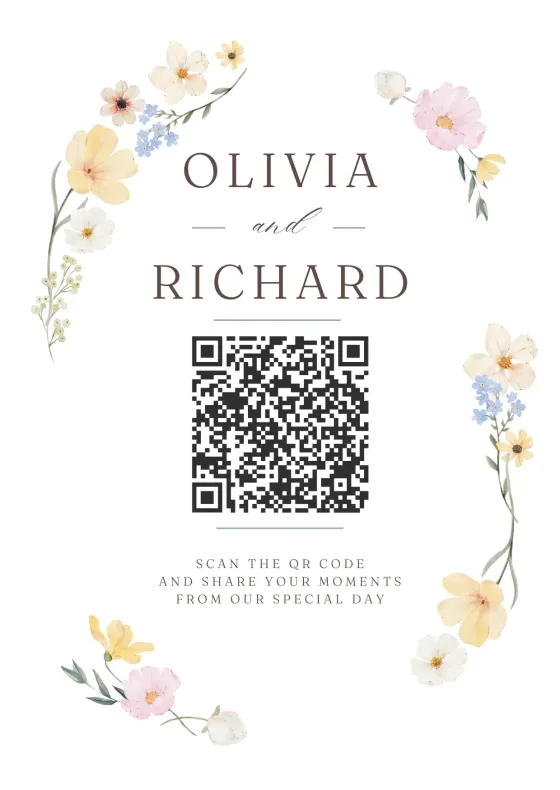

Capture with any camera
Front, back, or upload from gallery - all options work seamlessly
Far apart? Put both of you on one strip. Swap photos, drop them into a layout and download it in seconds. Free, no app, no sign-up.
Pick a layout, smile for the countdown and download a print-ready strip in seconds.
Your photos stay on your device. Nothing is uploaded.
Creating your video…
Try another layout, filter or color. Everything updates instantly.
Tap a photo to retake it.
Friends in different cities?
Start a free shared album. Everyone adds photos from their own phone, wherever they are, and all of them end up in one place. Free for up to 10 people.
Friends in different cities?
Start a free shared album. Everyone adds photos from their own phone, wherever they are, and all of them end up in one place. Free for up to 10 people.
A strip can mix photos taken anywhere, so distance doesn't matter. Here's the quickest way.
Agree on a pose or a theme, then each take your photos, in this booth or with your phone camera. Send yours to whoever is making the strip.
Pick a layout with one frame per photo: Side by side for two, Classic strip for four, Photo sheet for six. Tap Upload photos and select them all at once.
Add a caption and the date, pick a background color, then download the strip or tap Share. The Double strip prints two copies on one 4×6 photo: one for each of you.
How to share one photo booth when you're not in the same room.
Yes. The booth doesn't care where a photo was taken. One of you collects everyone's photos and uploads them together, and they fill the frames in the order you select them.
Side by side puts one photo of each of you next to each other. For more photos, use the Classic strip and alternate: you, them, you, them. The Double strip gives you two copies of the same strip on one 4×6 print.
Yes. Take screenshots during the call with both of you on screen and upload them, or each shoot your own photos in the booth while you talk and swap them afterwards.
Yes. The strip is made on the device of whoever builds it, and nothing is uploaded to our servers. Your photos only travel the way you send them to each other.
For a group trip, a birthday or friends in different cities, a shared JoinMyMoment album is easier: everyone adds photos and videos from their own phone, wherever they are, and you download them all at once. It's free for up to 10 people.
Trusted by event professionals worldwide






Setting up takes less than 2 minutes. Your guests will love how easy it is.
Sign up free and customize your event. Add a name, set guest limits, and make it yours.
Explore FeaturesDisplay the QR code at your event. Guests scan with their camera - no app download needed.
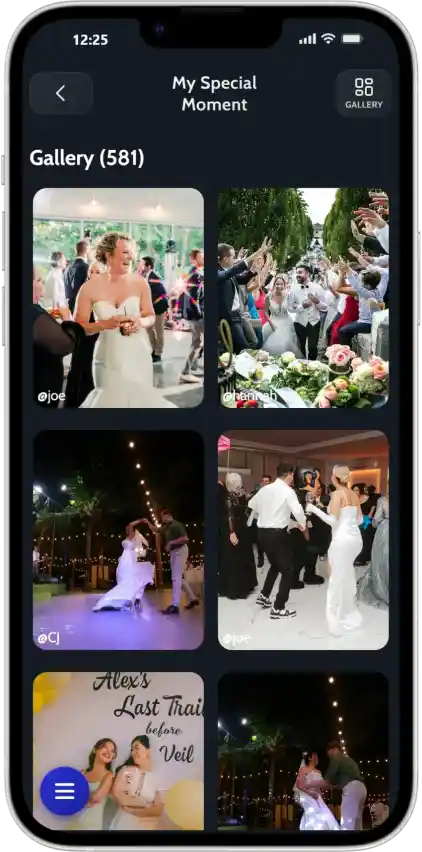
Browser-BasedWatch your shared album fill with candid moments in real-time. Download everything when ready.
Try NowEvery guest becomes a photographer. Every angle gets captured. Every memory is saved in one place.
Powerful features that make capturing memories simple and fun.
Works directly in any mobile browser. Guests just scan and shoot.
Learn more →iPhone, Android, tablets - if it has a browser, it works.
Learn more →Add your branding, set photo limits, control who can access.
Learn more →Supports English, Spanish, German, French, Romanian, and more.
Learn more →Filter photos by guest to see unique perspectives.
Learn more →Free tier available. Paid plans start at just a few dollars.
View pricing →Weddings, birthdays, corporate events, reunions, parties - wherever memories are made, JoinMyMoment brings everyone together.
See what our users have to say about their experience.
We wanted a fun way for guests to capture moments at our wedding without everyone being glued to their phones. JoinMyMoment was perfect!
We used JoinMyMoment for our company party, and it was a hit! The security feature let us restrict access to company emails. Definitely using it again!
I first used JoinMyMoment for my bachelorette party, and it was so much fun that we got it for the wedding too! Absolutely loved it!
No one had to manually share photos afterward, it was all in one place. Such a great idea!
I set up JoinMyMoment as a surprise for my best friend's wedding. They were blown away! It's the perfect wedding gift!
I hosted a karaoke night and decided to use JoinMyMoment for fun. It was hilarious seeing all the wild singing faces pop up! I'm definitely using it again!
Try free, only commit when you need more guests.
One-time payment · No subscription
Powerful features to enrich your event — some included free with every plan, some available as optional upgrades.
Let guests record spontaneous 15-second clips — the toast, the first dance, the laugh you almost missed. Bring your album to life with motion.
A voice note beats any caption. Guests leave heartfelt recordings you'll actually want to hear years from now.
Never turn a guest away. Unlock unlimited uploads so every candid, every selfie, and every group shot finds its place in the album.
Your event album flows straight into Google Photos — organized, backed up, and searchable. Zero exports. Zero extra steps.
Not sure which plan fits your event?
Pick your guest count and any extras — your total updates live.
Prices in USD · Choose your preferred currency at checkout
Create your Moment now Try a live demoEverything you need to know about JoinMyMoment.
JoinMyMoment is a simple and modern disposable camera app that helps you collect all the memories from your event in one place. Guests can join instantly—no app downloads or accounts needed—so it’s super easy for everyone to use. Unlike many other disposable camera apps, it doesn’t just capture photos; you can also save videos and even voice messages, making moments feel more real and personal. There’s a free option to get started, and overall it’s one of the most affordable choices out there. Whether it’s a wedding, party, or special event, JoinMyMoment makes it easy to capture everything without the usual hassle.
It's easy! Simply sign up for an account (you can also sign in with Google), fill in the necessary details (name of the Moment, number of guests, etc.), and you're all set. It's that easy!
No, guests do not need an account to join your Moments. They can simply set a username and join instantly.
You control how many pictures a guest can take. Anywhere from 5 to unlimited.
Yes! Guests can take both photos and videos. Uploading videos is an experimental feature.
For each Moment there is an associated shared photo album that you can access at any time. The owner can see and delete images at all times during and after the event. You can choose if you want guests to be able to see all the photos, or just the ones taken by them.
You can delete any photo from the shared gallery as the owner of the event.
Each Moment's photos are stored for an additional 60 days after the event ends, giving you plenty of time to download them to your personal device using the 'Download all' button from inside the gallery.
You can set up your moment to last anywhere from a few minutes, to up to 15 days.
Yes! You can restrict access to authenticated guests or even limit guests to specific email domains. Even more, you can pause and resume Moments whenever you want.
Guests can share or download photos from the shared photo album.
You can safely pay online with your credit or debit card OR you can simply use Apple Pay or Google Pay. It's that simple!
Yes! You get an invoice right after you complete your payment. It doesn't matter if you purchase as an individual or as a business.
You control when the event starts and ends, but as soon as you complete the payment, you can start sharing the Moment with anyone.
Yes, internet access is required — both for you and your guests. Without it, guests won't be able to upload photos, videos, or any other files, and won't be able to view the gallery. If your event takes place somewhere with limited or no connectivity, you can extend your Moment's duration (up to 15 days total) so guests can upload their content later, once they have a good internet connection.
Of course! For more information please don't hesitate to contact us at b2b@joinmymoment.com
Of course! Keep an eye out.
Join thousands of event hosts who trust JoinMyMoment to collect their most precious memories.

Have a question? Visit our FAQ section. You might find your answer there.
Didn't find what you were looking for? Reach us at contact@joinmymoment.com and we'll respond as soon as possible.